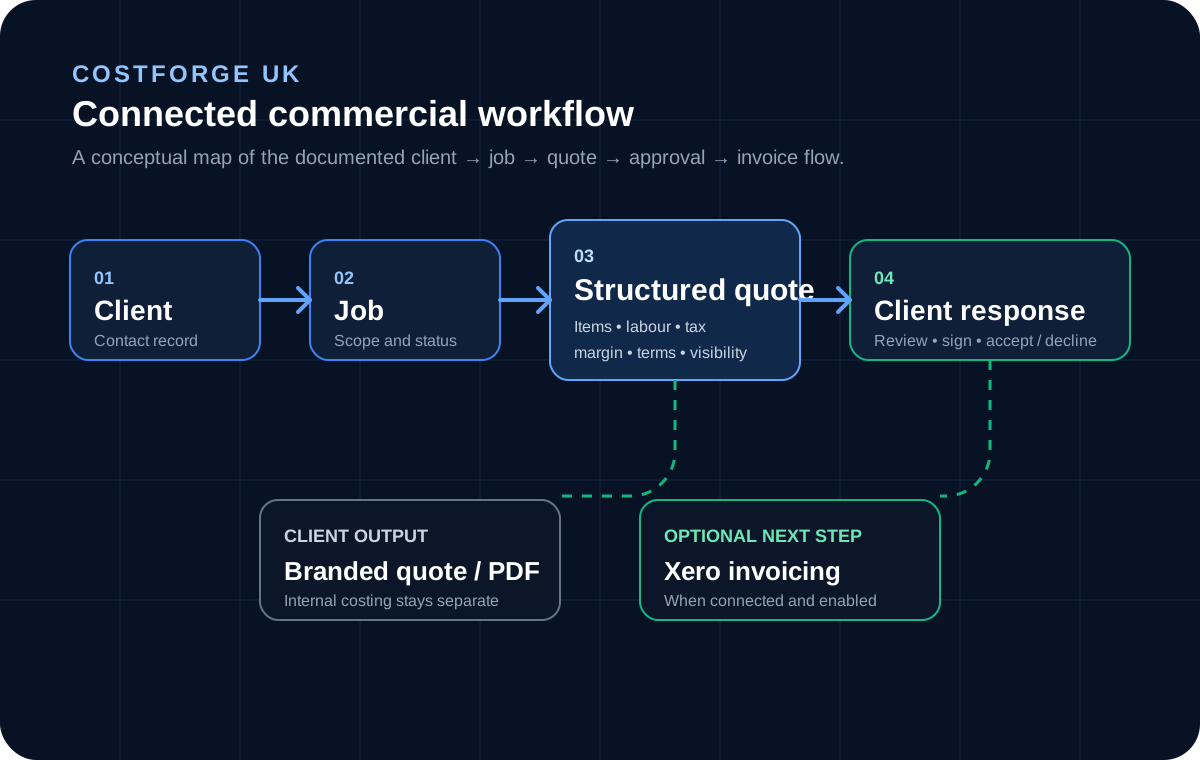
CostForge connects client and job records with structured quote building, labour costing, reusable templates, branded delivery, signed client responses and an optional Xero invoice workflow.
CostForge is strongest in the pre-work commercial process: organise the client and job, build the quote, control internal detail, deliver a professional client version, capture the response and optionally continue accepted work into Xero invoicing.
01
Client and job records
Keep the commercial context attached to the work.
Create client records, add multiple jobs beneath each client, and keep quote activity associated with the job it belongs to. Job statuses cover active, on-hold and completed work.
Client contact details, address and notes
Separate invoice email for accounts workflows
Multiple jobs per client
Active, on-hold and completed job statuses
02
Structured quoting
Build detailed quotes without flattening the job.
Quotes can combine parent and child items, quantities, unit prices, labour, configurable tax and internal margin while preserving a clearer client-facing version of the same commercial record.
Nested parent and child quote items
Issue date, expiry date, payment terms and terms & conditions
Draft, sent, accepted and declined statuses
Per-item visibility controls for client output
03
Labour costing
Use defined staff roles and hourly rates in quotes.
Administrators can maintain labour roles with hourly rates and use staff-hours quote items to cost labour consistently instead of retyping rates for every estimate.
Staff role name, hourly rate and department
Active and inactive labour roles
Staff-hours quote items with role and hours
Rate-derived labour values inside the quote
04
Reusable quote templates
Reuse proven scope without rebuilding it from scratch.
Save complete quotes or item groups as templates, then import reusable structure into another quote and edit it for the job in front of you.
Full quote templates
Reusable item and group templates
Template search and preview
Archive, restore and edit template records
05
Branded client delivery
Keep internal costing separate from the client document.
CostForge supports company branding, a dedicated client preview and separate internal and client-facing PDF concepts so the business can retain working detail without exposing it unnecessarily.
Company logo, contact details and quote colours
Client preview that respects item visibility
Client PDF without a separate internal margin line
Internal PDF with more detailed costing information
06
Signed online response
Give the client a clear accept-or-decline step.
When a quote is sent, CostForge can create a tokenised public response link. The client can review the quote, enter their name, provide a signature and accept or decline without a staff account.
Unique public quote-response link
No staff login required for the client
Name and signature captured with the response
Response status and timestamp stored against the quote
07
Team and operational visibility
Manage access and see the quoting pipeline in one workspace.
Workspace roles cover owner, admin and member access. Operational reporting includes client, job and quote totals, quote conversion, job completion, quote statuses, open follow-up counts and recent activity.
Owner, admin and member workspace roles
Email invitations and role management
Quote conversion and job completion metrics
Recent quote activity and open follow-up counts
08
Live Xero integration
Carry accepted quote values into the Xero invoice workflow.
The released Xero integration can connect a Xero organisation through OAuth and, when configured, create invoice records from accepted quotes. Full-invoice and deposit-plus-balance modes are supported, along with optional invoice email and invoice-status synchronisation.
Focused on quoting, costing, approval and invoicing handoff.
CostForge is not positioned as a complete ERP, full accounting package or full project-management suite. Its strongest scope is the connected commercial workflow before and around accepted work.
Internal control
Keep costing and client-facing detail deliberately separated.
Operational metrics
Track documented quote and job pipeline measures without claiming unrestricted BI.
Client context
Keep jobs and quotes connected to the client record.
Accounting handoff
Use the live Xero integration for its documented invoice workflow when configured.
Compare the current product
Choose the workflow first, then check the current plan options.
Product capabilities live here. Current pricing, package limits and plan details stay on the pricing page so commercial information has one source of truth.